
Built for MSPs and SOC teams
Turn Security Data into Actionable Intelligence
Detect threats. Correlate activity. Enrich incidents. Validate with humans.
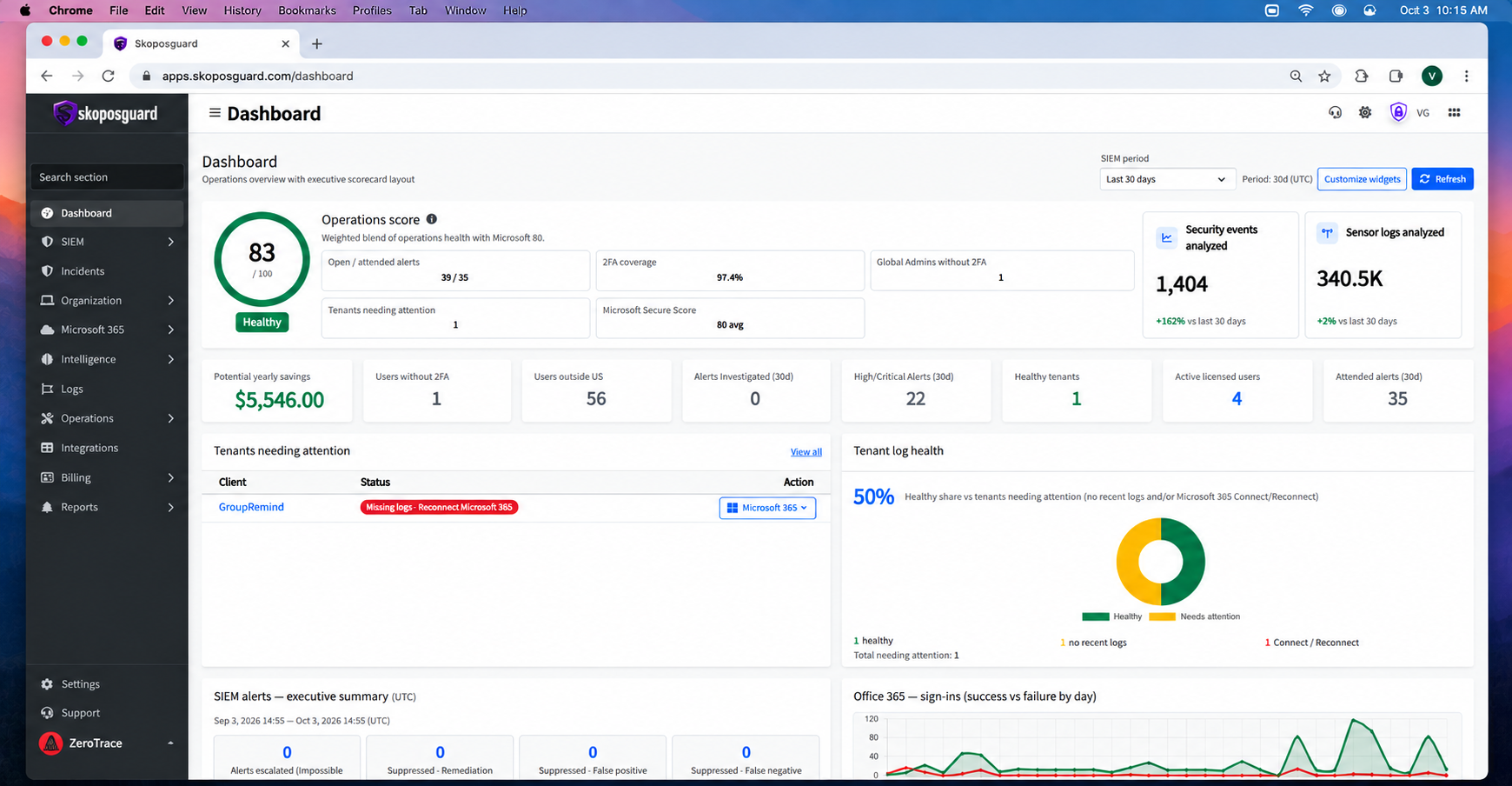
We’re not building another SIEM. We’re building the security platform we always wished existed—designed by an MSP, for MSPs, with real-world security operations in mind.
Features & Benefits
Security Intelligence Built for MSPs
Security Visibility. Detection. Correlation. One Platform.
SkoposGuard brings Microsoft 365 identity monitoring, threat detection, security integrations, and incident intelligence together in one place.
Monitor suspicious activity, correlate related security events, and gain the context needed to understand potential threats before they become incidents.

Identity & Sign-In Security
Identify suspicious authentication activity and potential account compromise.
- Impossible Travel Detection
- Sign-ins Outside the United States
- New Country Login Detection
- Failed Login Monitoring & Spikes
- MFA & Authentication Visibility
- Known vs. Unknown Device Analysis
- Sign-In Location & IP Analysis

Microsoft 365 Threat Detection
Detect suspicious changes and activities that may indicate a compromised Microsoft 365 account.
- Suspicious Inbox Rule Detection
- External Mailbox Forwarding
- OAuth Application Grants
- Administrative Role Changes
- eDiscovery Activity & Spikes
- Microsoft Security Alerts
- Risky Users & Identity Protection Events

Risk & Incident Intelligence
Turn individual security events into a complete incident story.
- Correlated Security Events
- Risk Evolution
- Attack Timelines
- Automated Incident Enrichment
- Security Risk Scoring
- IP & Location Context
- Device-Aware Analysis
- Related Activity Detection

Microsoft 365 Audit Visibility
Centralized visibility into Microsoft 365 and Entra activity for security monitoring and investigation.
- Microsoft Unified Audit Log Collection
- Authentication Activity
- Administrative Activity
- User Activity
- Microsoft 365 Security Events
- Historical Security Investigation
- Audit Log Search & Analysis
- Continuous Audit Monitoring

Security Integrations
Bring security data from multiple platforms into a unified security view.
- Microsoft 365 & Entra ID
- SentinelOne
- Cisco Umbrella
- Duo Security
- PSAs
- Cross-Platform Security Correlation

Reporting & Security Posture
Transform security data into clear, actionable information for MSPs and their customers.
- Security Posture Monitoring
- Monthly Security Reporting
- Executive Summary Reporting
- Integration-Specific Reports
- Security Trends
- Risk Evolution Reporting
- Authentication & Identity Trends
- Security Activity Metrics
Validation in Action
From Alert to Verified Incident
SkoposGuard doesn’t just detect alerts — it builds the story behind them.
Features & Benefits
Everything You Need to Build, Launch & Scale
Human-first, automation-powered security notifications.
SkoposGuard eliminates false positives through direct interaction with users by phone or SMS. Instead of wasting time confirming alerts, technicians instantly know whether an event is legitimate — reducing response times and automatically documenting tickets.
Scalability & Flexibility
Multi-tenant architecture for MSPs
- Multi-tenant architecture for MSPs
- Deploy across multiple clients and locations
- Built to scale without performance loss
Smart Alerts & Notifications
- Real-time alerts via voice call or SMS
- Users confirm or deny activity instantly
- Validate alerts in under 30 seconds
Seamless Integration
- Native integration with Microsoft 365 and PSAs
- Sync alerts and tickets automatically
- Works alongside your SIEM or standalone
Workflow Automation
- Trigger actions based on user response
- Auto-close false positives
- Lock accounts or escalate real threats
User-Centric Security Response
- Two-way communication with end users
- Reduce false positives with real validation
- Increase security awareness without training
Advanced Analytics
- Track response time and validation rates
- Measure technician time saved (~10 min per alert)
- Visibility into alert trends and user behavior
Validation in Action
Human-Verified Security Alerts
Instead of relying solely on logs and assumptions, SkoposGuard directly interacts with users to confirm suspicious activity — reducing false positives and accelerating response.

User-Driven Validation
Instant User Validation — No App Needed
✔ Confirm / Deny activity in seconds
✔ Auto-close false positives
✔ Escalate real incidents instantly
✔ Full audit trail

Featured Sections
Voice & SMS-Based Security Validation
Authenticate or reject activity in seconds — via call or text message. No apps, no downloads — just fast, human validation that cuts down false alerts and speeds up ticket resolution.

Mobile App
No App Required
SkoposGuard works through secure phone calls and SMS — no installations, no updates, and no learning curve. All users need is a phone.
Branding
Adaptive Security Branding
Customize call greetings, voice identities, and interaction flows to match your company’s branding and tone — preserving trust in every interaction.
Microsoft 365 Integration
Monitor real-time login activity and detect unusual access patterns directly from your Microsoft 365 environment.
SkoposGuard can analyze sign-in logs and notify users immediately when suspicious behavior is detected — before it becomes a threat.
Frequently Asked Questions
Lorem ipsum is placeholder text commonly used in the graphic, print, and publishing industries for previewing layouts and visual mockups.
What is SkoposGuard and how does it work?
SkoposGuard is a security automation platform that connects your SIEM or monitoring tools with a PBX system to notify users via secure phone calls. It allows real-time alerts, user verification, and automated responses such as account lockout, password reset, or escalation—all by voice interaction.
Do I need to install an app or software on user devices?
No. SkoposGuard operates entirely through voice calls—no apps, no downloads, no user-side configuration. All the user needs is access to a phone.
What systems and platforms does SkoposGuard integrate with?
We currently support seamless integration with Microsoft 365, PSAs, and most SIEM and PSA platforms. More integrations are being added continuously.
How does SkoposGuard handle user authentication over phone calls?
Users are verified through custom workflows, which may include passphrases, PIN validation, or secure callback confirmation. For sensitive actions, multi-factor identity verification can be enforced.
Is the system scalable for multi-site or enterprise deployments?
Absolutely. SkoposGuard is built to support everything from small MSPs to large, distributed enterprises with thousands of endpoints and users across regions.
Can I customize the voice prompts and workflows for my organization?
Yes. You can fully customize voice greetings, call flow logic, alert priorities, and escalation paths. SkoposGuard is built to reflect your brand and operational needs.
What happens if a user doesn’t answer the call or misses the alert?
If the user doesn’t respond, SkoposGuard automatically escalates the incident based on your configured workflow. This can include notifying a manager, triggering follow-up actions, or escalating to your security operations team.
Try It Free. Scale When You’re Ready.
Get started without limits. Explore all features at your own pace — upgrade only when your business grows.